表述性状态传输 (REST)是一种架构风格,它定义了一组用于创建 Web 服务的约束。REST API 是一种无需任何处理即可简单灵活地访问 Web 服务的方式。
Spring MVC是一个用于构建 Web 应用程序的 Web MVC 框架。它是一个与 spring boot、spring-security 等相同的 spring 模块。术语 MVC 代表模型-视图-控制器架构。REST API 调用如今被广泛用于获取各种信息,例如天气、邮政编码、secret、大学详细信息等.
在本文中,让我们尝试通过以下方式获取电视连续剧详细信息
http://api.tvmaze.com/search/shows?q=<任何电视连续剧名称>https://api.tvmaze.com/search/shows?q=mahabharata[ { "score": 0.54483813, "show": { "id": 60856, "url": "https://www.tvmaze.com/shows/60856/the-mahabharata", "name": "The Mahabharata", "type": "Scripted", "language": "English", "genres": [], "status": "Ended", "runtime": null, "averageRuntime": null, "premiered": "1990-03-10", "ended": "1990-03-24", "officialSite": null, "schedule": { "time": "", "days": [] }, "rating": { "average": null }, "weight": 5, "network": { "id": 269, "name": "Star Plus", "country": { "name": "India", "code": "IN", "timezone": "Asia/Kolkata" }, "officialSite": null }, "webChannel": null, "dvdCountry": null, "externals": { "tvrage": null, "thetvdb": 213551, "imdb": "tt0097810" }, "image": { "medium": "https://static.tvmaze.com/uploads/images/medium_portrait/398/996547.jpg", "original": "https://static.tvmaze.com/uploads/images/original_untouched/398/996547.jpg" }, "summary": null, "updated": 1646508699, "_links": { "self": { "href": "https://api.tvmaze.com/shows/60856" }, "previousepisode": { "href": "https://api.tvmaze.com/episodes/2289706" } } } }, { "score": 0.40868765, "show": { "id": 5016, "url": "https://www.tvmaze.com/shows/5016/mahabharat", "name": "Mahabharat", "type": "Scripted", "language": "Hindi", "genres": [ "Drama", "History" ], "status": "Ended", "runtime": 20, "averageRuntime": 20, "premiered": "2013-09-16", "ended": "2014-08-16", "officialSite": "http://www.hotstar.com/#!/mahabharat-435-s", "schedule": { "time": "20:30", "days": [ "Monday", "Tuesday", "Wednesday", "Thursday", "Friday", "Saturday", "Sunday" ] }, "rating": { "average": null }, "weight": 37, "network": { "id": 269, "name": "Star Plus", "country": { "name": "India", "code": "IN", "timezone": "Asia/Kolkata" }, "officialSite": null }, "webChannel": null, "dvdCountry": null, "externals": { "tvrage": 46350, "thetvdb": 273350, "imdb": "tt3212600" }, "image": { "medium": "https://static.tvmaze.com/uploads/images/medium_portrait/21/54241.jpg", "original": "https://static.tvmaze.com/uploads/images/original_untouched/21/54241.jpg" }, "summary": "<p>The story of the throne of Hastinapura, the kingdom ruled by the Kuru clan. The two collateral branches of the family that participate in the struggle of the throne of Hastinapura are the Kaurava and the Pandava. Although the Kaurava is the senior branch of the family, Duryodhana, the eldest Kaurava, is younger than Yudhisthira, the eldest Pandava. Both Duryodhana and Yudhisthira claim to be first in line to inherit the throne. The struggle culminates in the great battle of Kurukshetra, in which the Pandavas are ultimately victorious. The battle produces complex conflicts of kinship and friendship, instances of family loyalty and duty taking precedence over what is right, as well as the converse.</p>", "updated": 1604823863, "_links": { "self": { "href": "https://api.tvmaze.com/shows/5016" }, "previousepisode": { "href": "https://api.tvmaze.com/episodes/314287" } } } }, { "score": 0.38368216, "show": { "id": 16607, "url": "https://www.tvmaze.com/shows/16607/mahabharat", "name": "Mahabharat", "type": "Scripted", "language": "Hindi", "genres": [ "Drama" ], "status": "Ended", "runtime": 45, "averageRuntime": 45, "premiered": "1988-10-02", "ended": "1990-07-15", "officialSite": null, "schedule": { "time": "", "days": [ "Sunday" ] }, "rating": { "average": null }, "weight": 24, "network": { "id": 1093, "name": "DD National", "country": { "name": "India", "code": "IN", "timezone": "Asia/Kolkata" }, "officialSite": null }, "webChannel": null, "dvdCountry": null, "externals": { "tvrage": null, "thetvdb": 84349, "imdb": "tt0158417" }, "image": { "medium": "https://static.tvmaze.com/uploads/images/medium_portrait/55/138442.jpg", "original": "https://static.tvmaze.com/uploads/images/original_untouched/55/138442.jpg" }, "summary": "<p><b>Mahabharat</b> is a successful Indian television series based on the ancient Indian epic Mahabharata. The 94-episode series originally ran from 1988 to 1990. It was produced by B. R. Chopra and directed by his son, Ravi Chopra.</p>", "updated": 1573325769, "_links": { "self": { "href": "https://api.tvmaze.com/shows/16607" }, "previousepisode": { "href": "https://api.tvmaze.com/episodes/762035" } } } }]使用Spring框架,让我们尝试提取REST API并将其呈现在页面上。
<project%20xmlns="http://maven.apache.org/POM/4.0.0" xmlns:xsi="http://www.w3.org/2001/XMLSchema-instance" xsi:schemaLocation="http://maven.apache.org/POM/4.0.0%20 http://maven.apache.org/maven-v4_0_0.xsd">%20 <modelVersion>4.0.0</modelVersion>%20 <groupId>com.TVShow.TVShow_Rest_API</groupId>%20 <artifactId>TVShow_Rest_API</artifactId>%20 <packaging>war</packaging>%20 <version>0.0.1-SNAPSHOT</version>%20 <name>TVShow</name>%20 <url>http://maven.apache.org</url>%20 <properties>%20 <failOnMissingWebXml>false</failOnMissingWebXml>%20 <spring-version>5.1.0.RELEASE</spring-version>%20 </properties>%20 <dependencies>%20 <!--%20https://mvnrepository.com/artifact/org.springframework/spring-webmvc%20--> <dependency>%20 <groupId>org.springframework</groupId>%20 <artifactId>spring-webmvc</artifactId>%20 <version>${spring-version}</version>%20 </dependency>%20 <!--%20Required%20for%20spring-test%20--> <dependency>%20 <groupId>org.springframework</groupId>%20 <artifactId>spring-test</artifactId>%20 <version>${spring-version}</version>%20 </dependency>%20 <!--%20JSTL%20Dependency%20--> <dependency>%20 <groupId>javax.servlet.jsp.jstl</groupId>%20 <artifactId>javax.servlet.jsp.jstl-api</artifactId>%20 <version>1.2.1</version>%20 </dependency>%20 <dependency>%20 <groupId>taglibs</groupId>%20 <artifactId>standard</artifactId>%20 <version>1.1.2</version>%20 </dependency>%20 <!--%20Servlet%20Dependency%20--> <dependency>%20 <groupId>javax.servlet</groupId>%20 <artifactId>javax.servlet-api</artifactId>%20 <version>3.1.0</version>%20 <scope>provided</scope>%20 </dependency>%20 <!--%20JSP%20Dependency%20--> <dependency>%20 <groupId>javax.servlet.jsp</groupId>%20 <artifactId>javax.servlet.jsp-api</artifactId>%20 <version>2.3.1</version>%20 <scope>provided</scope>%20 </dependency>%20 <!--%20As%20REST%20API%20is%20extracted,%20this%20is%20required%20--> <dependency>%20 <groupId>com.google.code.gson</groupId>%20 <artifactId>gson</artifactId>%20 <version>2.8.6</version>%20 </dependency>%20 <dependency>%20 <groupId>commons-io</groupId>%20 <artifactId>commons-io</artifactId>%20 <version>2.5</version>%20 </dependency>%20 <dependency>%20 <groupId>junit</groupId>%20 <artifactId>junit</artifactId>%20 <version>4.12</version>%20 <scope>test</scope>%20 </dependency>%20 </dependencies>%20 <build>%20 <finalName>TVShow</finalName>%20 <sourceDirectory>src/main/java</sourceDirectory>%20 <plugins>%20 <plugin>%20 <artifactId>maven-compiler-plugin</artifactId>%20 <version>3.5.1</version>%20 <configuration>%20 <source>1.8</source>%20 <target>1.8</target>%20 </configuration>%20 </plugin>%20 <plugin>%20<groupId>org.apache.maven.plugins</groupId>%20<artifactId>maven-war-plugin</artifactId>%20<version>3.3.2</version>%20</plugin>%20 <plugin>%20 <groupId>org.codehaus.mojo</groupId>%20 <artifactId>tomcat-maven-plugin</artifactId>%20 <version>1.0-beta-1</version>%20 </plugin>%20 </plugins>%20 </build>%20</project>这是项目部署到tomcat时渲染的页面
<!DOCTYPE%20html>%20<html%20lang="en">%20<head>%20 <meta%20charset="utf-8">%20 <meta%20http-equiv="X-UA-Compatible"%20content="IE=edge">%20 <meta%20name="viewport"%20content="width=device-width,%20initial-scale=1">%20 <title>TVShow</title>%20 <link%20rel="stylesheet"%20href="https://maxcdn.bootstrapcdn.com/bootstrap/4.5.0/css/bootstrap.min.css">%20 <script%20src="https://ajax.googleapis.com/ajax/libs/jquery/1.12.4/jquery.min.js"></script>%20 <script%20src="https://maxcdn.bootstrapcdn.com/bootstrap/4.5.0/js/bootstrap.min.js"></script>%20 //%20for%20making%20the%20page%20styles%20are%20applied%20 <style%20type="text/css">%20 .main-form,%20.profile-area%20{%20 width:%20500px;%20 }%20 .main-form%20{%20 margin:%2050px%20auto%200px;%20 }%20 .profile-area%20{%20 margin:%2010px%20auto;%20 }%20 .main-form%20section,%20.profile-area%20section%20{%20 margin-bottom:%2015px;%20 background:%20#097969;%20 box-shadow:%200px%202px%202px%20rgba(0,%200,%200,%200.3);%20 color:%20white;%20 }%20 .main-form%20section%20{%20 padding:%2030px;%20 }%20 .profile-area%20section%20{%20 padding:%2030px%2030px%2030px;%20 }%20 .profile-area%20section%20>%20div%20{%20 text-align:%20center;%20 }%20 .main-form%20h3%20{%20 margin:%200%200%2015px;%20 }%20 .form-control,%20.btn%20{%20 min-height:%2038px;%20 border-radius:%202px;%20 }%20 .btn%20{%20 font-size:%2015px;%20 font-weight:%20bold;%20 }%20 .hideElement%20{%20 display:%20none;%20 }%20 </style>%20</head>%20<body>%20<div%20class="main-form"%20id="main-form">%20 <section>%20 <div%20class="form-group">%20 //%20We%20need%20to%20input%20the%20search%20string%20in%20this%20box%20 <input%20id="searchStr"%20type="text"%20class="form-control"%20placeholder="Enter%20TVShow%20name%20here..."%20required="required">%20 </div>%20 <div%20class="form-group">%20 <button%20onclick="loadData()"%20class="btn%20btn-primary%20btn-block">Find%20TVShow%20Details</button>%20 </div>%20 </section>%20</div>%20<div%20class="profile-area%20hideElement"%20id="profile-area">%20 <section>%20 <div%20id="loader"%20class="hideElement">%20 <div%20class="spinner-border"%20role="status">%20 <span%20class="sr-only">Loading...</span>%20 </div>%20 </div>%20 <div%20id="profile"%20class="hideElement">%20 <br><br>%20 //%20parsed%20json%20object%20details%20are%20displayed%20here%20 <p><strong>TVShowScore%20:%20</strong><span%20id="scores"></span></p>%20 <p><strong>TVShow%20URL%20:%20</strong><span%20id="url"></span></p>%20 <p><strong>IMDB%20:%20</strong><span%20id="imdb"></span></p>%20 </div>%20 </section>%20</div>%20</body>%20<script>%20 function%20loadData()%20{%20 document.getElementById("profile-area").classList.remove("hideElement");%20 document.getElementById("loader").classList.remove("hideElement");%20 document.getElementById("profile").classList.add("hideElement");%20 var%20searchStr%20=%20document.getElementById("searchStr").value;%20 if(searchStr%20!=%20""%20&&%20searchStr%20!=%20null%20)%20{%20 var%20xhttp%20=%20new%20XMLHttpRequest();%20 xhttp.onreadystatechange%20=%20function()%20{%20 if%20(this.readyState%20==%204%20&&%20this.status%20==%20200)%20{%20 var%20jsonResponse%20=%20JSON.parse(this.responseText);%20 document.getElementById("scores").innerHTML%20=%20jsonResponse.scores;%20 document.getElementById("url").innerHTML%20=%20jsonResponse.url;%20 document.getElementById("imdb").innerHTML%20=%20jsonResponse.imdb;%20 document.getElementById("loader").classList.add("hideElement");%20 document.getElementById("profile").classList.remove("hideElement");%20 }%20 };%20 //%20GET%20method%20which%20redirects%20the%20jsp%20to%20connect%20to%20 //%20the%20servlet%20with%20the%20search%20string%20 xhttp.open("GET",%20"getTVShowDetailsBySearchString?searchStr="+%20searchStr,%20true);%20 xhttp.send();%20 console.log("done");%20 }%20else%20{%20 console.log("Enter%20search%20string%20to%20check...")%20 }%20 }%20</script>%20</html>-----------------------------------©著作权归作者所有:来自51CTO博客作者demo007x的原创作品,请联系作者获取转载授权,否则将追究法律责任如何通过%20REST%20API%20和%20Spring%20MVC%20提取电视节目详细信息?https://blog.51cto.com/demo007x/7917153在输入框中输入任何电视节目名称后,我们将获得以下详细信息。
从 JSP 页面,使用搜索字符串调用“GET”方法,并将其重定向到 Spring Controller 类,其中 REST API URL http://api.tvmaze.com/search/shows?q= 被调用,它将创建上面给出的 JSON 数组,从中,我们使用下面的参数:
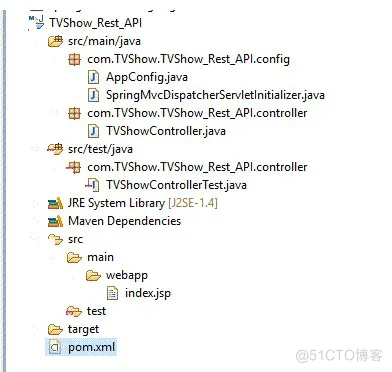
"score", "url" and "imdb" values aloneExample:"score": 0.42338097, "url": "https://www.tvmaze.com/shows/16607/mahabharat", "imdb": "tt0158417"实际上,在这个页面上,我们只检索了 TVShowScore、TVShow URL 和 IMDB。但我们可以获取 JSON 中提供的所有其他详细信息。检索数据和解析 JSON 输出所需的代码如下。实现流程的重要必要文件
import org.springframework.context.annotation.Bean; import org.springframework.context.annotation.ComponentScan; import org.springframework.context.annotation.Configuration; import org.springframework.web.servlet.config.annotation.EnableWebMvc; import org.springframework.web.servlet.view.InternalResourceViewResolver; import org.springframework.web.servlet.view.JstlView; @Configuration@EnableWebMvc@ComponentScan(basePackages = { "com.TVShow.TVShow_Rest_API" }) public class AppConfig { @Bean public InternalResourceViewResolver resolver() { InternalResourceViewResolver resolver = new InternalResourceViewResolver(); resolver.setViewClass(JstlView.class); resolver.setPrefix("/"); resolver.setSuffix(".jsp"); return resolver; } }import org.springframework.web.servlet.support.AbstractAnnotationConfigDispatcherServletInitializer; public class SpringMvcDispatcherServletInitializer extends AbstractAnnotationConfigDispatcherServletInitializer { @Override protected Class<?>[] getRootConfigClasses() { return null; } @Override protected Class<?>[] getServletConfigClasses() { return new Class[] { AppConfig.class }; } @Override protected String[] getServletMappings() { return new String[] { "/" }; } }import java.io.BufferedReader; import java.io.IOException; import java.io.InputStreamReader; import java.HttpURLConnection; import java.URL; import java.util.ArrayList; import java.util.Iterator; import java.util.StringTokenizer; import org.springframework.stereotype.Controller; import org.springframework.web.bind.annotation.RequestMapping; import org.springframework.web.bind.annotation.ResponseBody; import com.google.gson.Gson; import com.google.gson.JsonArray; import com.google.gson.JsonElement; import com.google.gson.JsonObject; @Controllerpublic class TVShowController { @RequestMapping("/getTVShowDetailsBySearchString") public @ResponseBody JsonObject getTVShowDetailsBySearchString(String searchStr) throws IOException { // According to the search string, JSONArray // or JSON Object is constructed. // In our case, it is producing JSONArray JsonArray jsonArray = new JsonArray(); jsonArray = getTVShowDetailsBySearchStr(searchStr); JsonObject finalJsonObject = new JsonObject(); ArrayList scoreList = new ArrayList(); ArrayList showUrlList = new ArrayList(); ArrayList showUrlLinks = new ArrayList(); ArrayList telecastedList = new ArrayList(); ArrayList imdbList = new ArrayList(); Iterator<JsonElement> objectIterator = jsonArray.iterator(); // Iterating while(objectIterator.hasNext()) { JsonElement object = objectIterator.next(); JsonObject jObj = object.getAsJsonObject(); // We have to get the score and // replace the special characters scoreList.add(jObj.get("score").toString().replaceAll("^/"|/"$", "")); // Similarly show showUrlList.add(jObj.get("show").toString().replaceAll("^/"|/"$", "")); } for (int i = 0;i < showUrlList.size();i++) { StringTokenizer jsonTokenizer = new StringTokenizer(showUrlList.get(i).toString(),","); String expectedTag = null; int idx = 0; while (jsonTokenizer.hasMoreTokens()) { expectedTag = jsonTokenizer.nextToken(); if (expectedTag.contains("url")) { showUrlLinks.add(expectedTag.substring(7,expectedTag.length()-1).toString()); } if (expectedTag.contains("timezone")) { telecastedList.add(expectedTag.substring(12,expectedTag.length()-3).toString()); } if (expectedTag.contains("imdb")) { imdbList.add(expectedTag.substring(8,expectedTag.length()-2).toString()); } } } finalJsonObject.addProperty("scores", scoreList.toString()); finalJsonObject.addProperty("scoresize", scoreList.size()); finalJsonObject.addProperty("url", showUrlLinks.toString()); finalJsonObject.addProperty("urlsize", showUrlLinks.size()); finalJsonObject.addProperty("timezone", telecastedList.toString()); finalJsonObject.addProperty("imdb", imdbList.toString()); finalJsonObject.addProperty("imdbsize", imdbList.size()); // After retrieving the elements, // in an object , all are constructed return finalJsonObject; } private JsonArray getTVShowDetailsBySearchStr(String searchString) throws IOException { StringBuilder responseData = new StringBuilder(); JsonArray jsonArray = null; URL url = null; // http://api.tvmaze.com/search/shows?q=<searchstring> // is the url to access the TV show details url = new URL("http://api.tvmaze.com/search/shows?q=" + searchString); HttpURLConnection con = (HttpURLConnection) url.openConnection(); con.setRequestMethod("GET"); con.setRequestProperty("User-Agent", "Mozilla/5.0"); int responseCode = con.getResponseCode(); System.out.println("/nSending 'GET' request to URL : " + url); // System.out.println("Response Code : " + responseCode); try (BufferedReader in = new BufferedReader( new InputStreamReader(con.getInputStream()))) { String line; while ((line = in.readLine()) != null) { responseData.append(line); } // It is getting converted to // JSONArray by means of below code jsonArray = new Gson().fromJson(responseData.toString(), JsonArray.class); } return jsonArray; } }-----------------------------------©著作权归作者所有:来自51CTO博客作者demo007x的原创作品,请联系作者获取转载授权,否则将追究法律责任如何通过 REST API 和 Spring MVC 提取电视节目详细信息?https://blog.51cto.com/demo007x/7917153通过使用 Spring-webmvc,我们可以从 REST API 调用中获取详细信息。上面就是一个很好的例子。同样,有很多开源 REST API 调用可供使用。这意味着我们可以使用它们来检索数据。开源 REST API 调用的几个示例。

本文链接:http://www.28at.com/showinfo-26-14017-0.html如何通过 REST API 和 Spring MVC 提取电视节目详细信息?
声明:本网页内容旨在传播知识,若有侵权等问题请及时与本网联系,我们将在第一时间删除处理。邮件:2376512515@qq.com
下一篇: Python并发编程:多线程技术详解

Copyright © 2016-2023 天津谷骐科技有限公司 版权所有 sitemap.xml
违法及侵权请联系:2376512515@qq.com 津ICP备18001702号
 津公网安备 12010102000574号